Author

samana

Browsing

Continuous integration and delivery is part of DevOps processes, and currently part of most software projects. In my previous blog post, I had a review of the problem and why infrastructure as code (IaC) matters. The analysis included the architecture diagram and the Azure components. In this blog post as the continuation, you can read and learn how to Implement Azure Infra using Terraform and Pipelines to be part of your CI/CD in Azure DevOps. This blog post includes a complete technical guide.

Terraform

Terraform is Infrastructure as code to manage and develop cloud components. The tool is not only for specific cloud ecosystem; therefore, it is popular among developer working in different ecosystems. Terraform uses various providers, and in Microsoft cloud case, it uses Azure provisioner (azurerm) to create, modify and delete Azure resources. As explained in the previous blog post, you need the Terraform CLI installed on the environment and Azure account to deploy your resources. To verify the installation, you can write “terraform –version” in the shell terminal to view the installed version of the CLI.

Terraform uses declarative state model. The developer writes the desired state of wanted infrastructure and Terraform will take care of the rest to achieve the results. The workspace consists of one or many .terraform files. The folder on the environment also includes hidden settings and plugins files. The basic Azure provider block with subscription and resource block selection looks like this in main.tf file.

provider "azurerm" {
    version = "~>1.32.0"
    use_msi = true
    subscription_id = "xxxxxxxxxxxxxxxxx"
    tenant_id       = "xxxxxxxxxxxxxxxxx"
}
resource "azurerm_resource_group" "rg" {
    name     = "myExampleGroup"
    location = "westeurope"
}

The provider needs to authenticate to Azure before being able to provision the infrastructure. At the moment there is four authentication models:

Azure DevOps Pipelines Structure

The pipeline definition is defined in the YAML file, which includes one or many stages of the CI/CD process. It’s worth mentioning that currently, Azure pipelines do not support all YAML features. This blog post is not about the YAML and to read more please refer to “Learn YAML in Y minutes“. In the structure of the YAML build file, the stage is the top level of a specific process and includes one or many Jobs with again has one or many jobs. Here is an example of the pipeline structure:

  • Stage A
    • Job 1
      • Step 1.1
      • Step 1.2
    • Job 2
      • Step 2.1
      • Step 2.2
  • Stage B

Terraform + Azure DevOps Pipelines

Now we have the basic understanding to Implement Azure infra using Terraform and Azure DevOps Pipelines. With the knowledge of Terraform definition files and also the YAML file, it is time to jump to the implementation. In my Github InfraProvisioning code repository root folder, there are three folders and the azure-pipelies.yml file. The YML file is the build definition file which has references to the subfolders which includes the job and step definitions for a stage. The stages in the YAML file refers to the validate, plan and apply steps require in Terraform to provision model.

variables:
  project: shared-resources

- stage: validate
    displayName: Validate
    variables:
      - group: shared
    jobs:
      - template: pipelines/jobs/terraform/validate.yml

  - stage: plan_dev
    condition: and(succeeded(), eq(variables['Build.SourceBranch'], 'refs/heads/master'))
    displayName: Plan for development
    variables:
      - group: shared
      - group: development
    jobs:
      - template: pipelines/jobs/terraform/plan.yml
        parameters:
          workspace: dev

  - stage: apply_dev
    displayName: Apply for development
    variables:
      - group: shared
      - group: development
    jobs:
      - template: pipelines/jobs/terraform/apply.yml
        parameters:
          project: ${{ variables.project }}
          workspace: dev

Each stage in the azure-pipelies.yml file refers to sub .yml files which are:

  • jobs/terraform/validate.yml: the step will download the latest version of the terraform, installs it and validates the installation.
  • jobs/terraform/plan.yml: this step gets the existing infrastructure definition and compares it to the changes, generates the modified infrastructure plan and publish the plan for the next stage.
  • jobs/terraform/apply.yml: will get the plan file, extract it, apply changes and save the output back to the storage account for the next run and comparison.

One more thing, in my previous blog post, I explained how Terraform would use blob storage to save the state files. Include the following job in your build definition if you want to create those initial Azure resources automatically. You can comment the step out once you have the required blob storage. After creating the storage account, create a new blob folder inside the storage account and also create a new secret. You will need these values later when adding all variables to the Azure DevOps environment.

 jobs:
      - job: runbash
        steps:
        - task: Bash@3
          inputs:
            targetType: 'filePath' # Optional. Options: filePath, inline
            filePath: ./tools/create-terraform-backend.sh
            arguments: dev

Settings in Azure DevOps

Most of the environment variables like Azure Resource Manager values are defined in the Group Variables in the Library section under Pipelines on the left navigation. The idea is to have as many environments as necessary in different subscriptions. If you inspect the apply.yml file, you can find the following variables:

  • ARM_CLIENT_ID: $(ARM_CLIENT_ID)
  • ARM_CLIENT_SECRET: $(ARM_CLIENT_SECRET)
  • ARM_TENANT_ID: $(ARM_TENANT_ID)
  • ARM_SUBSCRIPTION_ID: $(ARM_SUBSCRIPTION_ID)

To implement Azure infra using Terraform and Pipelines, we need to create an application in Azure Active Directory so Azure DevOps can access our resources in Azure. Follow the following steps to create the application:

  1. Navigate to Azure Portal and choose your Active Directory from the navigation.
  2. Under the AAD, choose Application Registration and create a new application. You can name it TerraformAzureDevOps.
  3. From the main page of the application, copy the Application ID and the Tenant Id. We will need these values later.
  4. Choose Certificates & secrets from the navigation and create a new secret. Copy this value before changing the view because you will see it once.

Back in the Azure DevOps, and under Library section we have to create the following Variable Groups with the following variables:

Name: Development

  • ARM_CLIENT_ID: [The application ID we created in the AAD]
  • ARM_CLIENT_SECRET: [The secret from the AAD]
  • ARM_SUBSCRIPTION_ID: [The Subscription ID from Azure]
  • TERRAFORM_BACKEND_KEY: [The secret from the storage account created using the create-terraform-backend.sh script ]
  • TERRAFORM_BACKEND_NAME: [The name of the blob folder created using the create-terraform-backend.sh script]
  • WORKSPACE: [Your choice of name, e.g. Dev]

Name: Shared

  • ARM_TENANT_ID: [The AAD Id]
  • TERRAFORM_VERSION: 0.12.18

Under each variable group the “Allow access to all pipelines” should be on!

Implement Azure infra Modifications

As you get the build definition up and running in your Azure DevOps environment all you have to do in the future is to edit the terraform/main.tf file to manage your Azure infrastructure.

Implement Azure infra using Terraform and Pipelines will help you to save a lot of time and money, not to mention it will also improve the quality, maintainability and the security of the environment.

You can find the complete solution and source files from my GitHub repository. Lastly, I want to give credits to my colleague Antti Kivimäki from Futurice, who has helped my team with difficult Terraform tasks.
The size and complexity of cloud infrastructure have a direct relationship with management, maintainability and cost control of cloud projects. It might be easy to create resources using the Azure Portal or the CLI, but when there is a need to update properties, change plans, upgrade services or re-create all services in new regions the situation is more tricky. The combination of Azure DevOps pipelines and Terraform brings an enterprise-level solution to solve the problem.

The Infrastructure Problem

My previous blog post introduced a simple SaaS architecture which included App services, SQL database, storage account and background processes using Azure Functions. But why should we create automation for such a small environment?

In my project, the need started to rise as I was creating background processes for the SaaS platform. Let’s assume we have three Azure Functions to send emails, SMS messages and modify user pictures. Each Function will start using the storage account queue triggers. What if each Function has to use the API to write values to the database. For some reason, the path for the API changes, and It would be insane to manually update the URL of the new end-point in three places. Not to speak if the service is running in three Azure regions and no one should update any value manually in the production environment and without approval processes.

Azure Infrastructure using Terraform

There are few solutions to have Infrastructure as code using Azure DevOps Pipelines. You can always export Azure resource ARM templates and create the pipeline based on that, but I found it complicated and time-consuming. The second choice was to use the Azure CLI in pipelines and create resources, but the problem will be with maintenances, and the more resources you have the management of the script will be laborious.

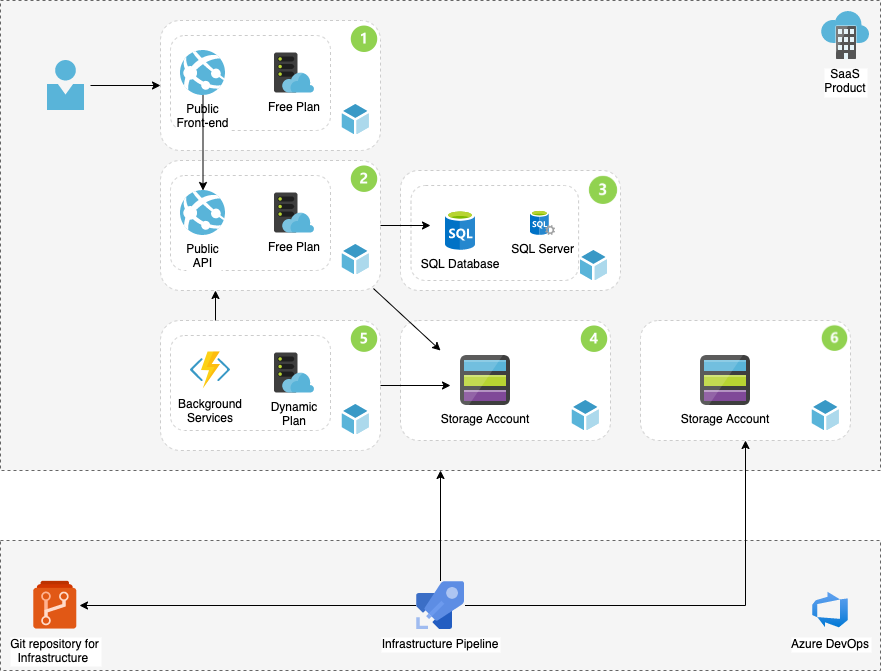
The third option was to use third-party tools, and to be honest; I got in love with Terraform. The tool has providers for major clouds and of course for tools for Azure. The easiest way to start with the tool is to install the CLI on your computer and following the 12 sectioned learning path. Let’s add the supplement parts to the existing architecture:

Azure Infrastructure using Terraform and Pipelines

The Explanations for items one to five are in my previous blog, so let’s concentrate on the new parts.

The New Components and the Build

Azure Infrastructure using Terraform and Pipelines requires knowledge of Terraform, and at this stage, I assume that you are familiar with the Terraform init, plan and apply terms. While running the Terraform locally, all configuration and metadata files will store on your computer hard disk. By moving the build to Azure DevOps Pipelines, there will be a need to store Terraform generated metadata and infrastructure code files.

Git repositories are a perfect solution to store Terraform infrastructure code files (.tf), and any other tools which are part of the pipeline. I have created a separated repository for my infrastructure in my project and named it InfraProvisioning.

To save the Terraform state and metadata files, we need different storage than GIT repository. Each Terraform execution will compare the current changes with the existing infrastructure and will override the existing environment. Azure Storage BLOB is a perfect location to save these files. The resource is marked as number six in the architecture diagram. But how should we automatically create the storage and include it as part of the automatic infrastructure?

I have created a Bash script which is for download from my Git Hub project. The script will login to the Azure using the CLI, create a Shared resource group, a storage account and BLOB storage. The Bash file is part of the build process and parametrised, but all parameters can be replaced with hard-coded values in the script. The Bash file is the initial part of the pipeline and how to implement the pipeline is the subject of my next blog post.

The mindset for start-ups is to keep the costs down and develop fast with quality. Therefore the idea is to have continuous improvement loops and publish the most viable product (MVP) version as soon as possible. Microsoft Azure provides services which are essential to the Software as a Service (SaaS) products. Most importantly and fortunately, most of these services have a free plan to kick start the development project. In this blog post, I’ll have a review of these free Azure essential services in SaaS architecture.

During 14 years of my career, I have worked with customers from different industry sectors and various project types. Most of them were Enterprise-grade business-to-business (b2b) solutions, and my experience with business-to.customer (b2c) products is quite narrow. As explained in my previous blog post, recent Azure certification exams are demanding, and studying requires a lot of reading and hands-on training. During my studies, the outcome product has taken my attention and interest to develop the product further. Let’s have a look at the SaaS high-level architecture in it’s purest form.

Simple SaaS Architecture

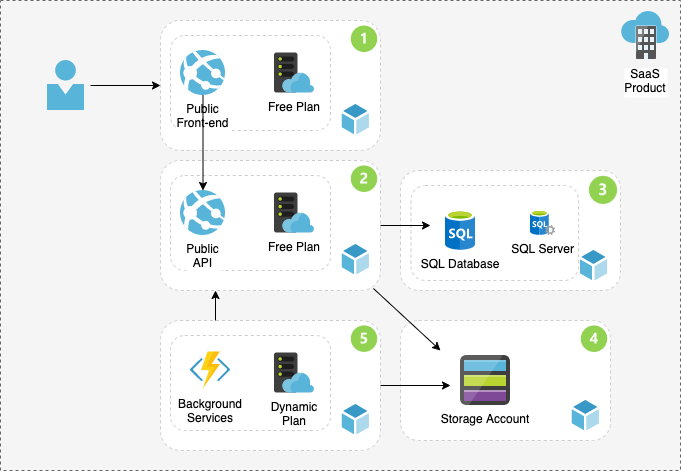
The illustration represents free azure services in Service-oriented SaaS architecture. These services are:

  1. App Service is a Platform as a Service which is the best solution to host the front-end layer and the UI of the product. Developing the UI by any best-of-breed front-end framework like Angular or React can be up and running on Azure with few clicks. The app service can be scaled as the demand grows, but you can kick start the project with the free plan.
  2. App API is based on App Service platform and will act as the service layer of the product. The API can also be developed with any popular back-end language like .net core, Node.js or Go lang. The service can be scaled up by demand, and it has many other useful features like hosting Docker containers to serve the API. The app service environment can be hosted either on Windows or Linux environment.
  3. Azure SQL is also a Platform as a service product which should not be confused with the self-hosted Microsoft SQL Server. The Azure SQL database does not require a SQL server licence, and you pay based on the Database Throughput Unit or DTU. Developers can have SQL relational database so serve the API layer. The Azure SQL does not have a free tire, but the Basic tire with 5 DTU costs under five euro per month.
  4. The Storage Account is a package of four different services, and you pay only for the use. The following services are essential for the SaaS product:
    • Blob Storage is the solution to host images, videos and binary files.
    • Table Storage is the part of the storage account to host non-relational data in a table format where the schema can scale based on needs.
    • Storage Queue is a simple service bus solution to enable event-based operations.
  5. Azure functions are server-less PaaS product which is hosted on the App Services environment and is a perfect solution for handling the background processes. To read more about Azure Functions in cation and hosting plans, please refer to my previous blog posts.

The services above are the perfect initial parts of a SaaS application. The architecture can be extended with other services to provide an industry lead solution which can be topics for my next blog posts.

The latest Azure certification exams are demanding and need a lot of demos and hands-on training. During the preparations and experiments, an e-commerce Azure Saas Platform was formed unintentionally.

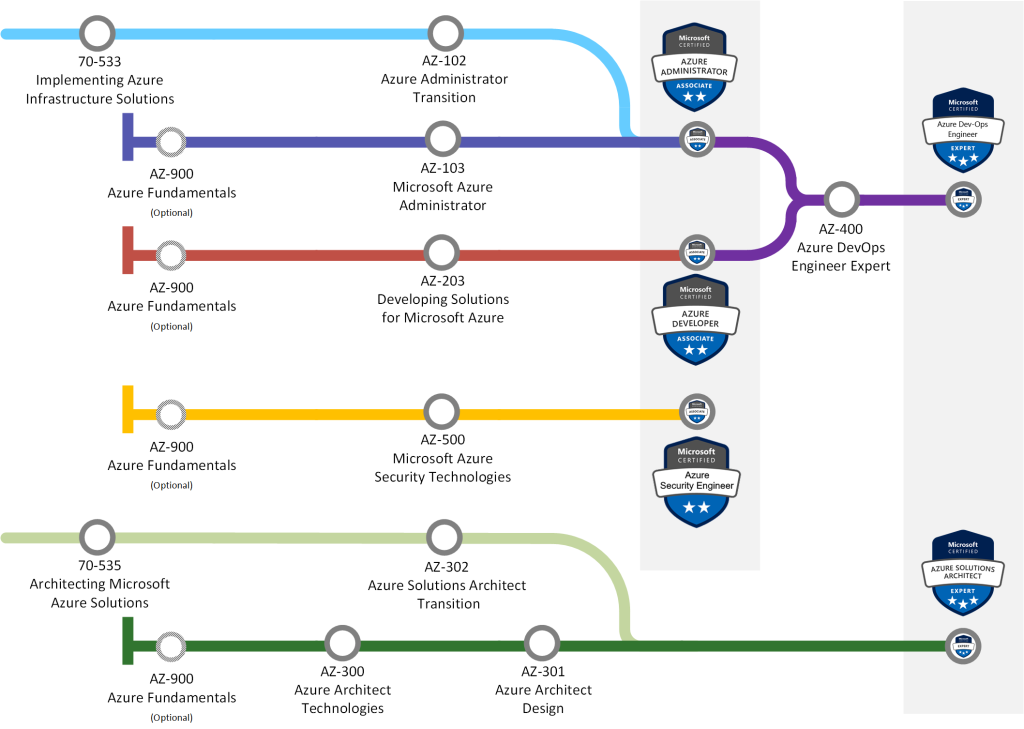
Taking Microsoft certification exams has been apart of my professional career since 2007. Certifying myself not only verifies the current level of my knowledge but also makes me study hard for newly available technology. I’m currently on the DevOps journey with the following exams:

Azure certification paths to create a SaaS product
Azure certification paths in 2019

Experiments turned to a SaaS platform

There are many guides and blog posts on how to study for exams and what materials to read. I find it best to read Microsoft documentation, create demos and have experiments. During the study period, my demos and architectural decisions became a fully functioning Azure SaaS platform. I’m still on the study path, so there is a room for upgrades and changes in the architectural decisions.

The demo I have created is an e-Commerce solution using Azure products and services, which are a part of measured skills in exams. To improve processes and add an extra layer to the intelligence of the application, Microsoft provides AI tools part of Microsoft Cognitive Services which I plan to include in the platform. The trial by applying AI services provided by Microsoft will also indicate the maturity of these services and a way to observe how enterprise solution-ready they are.

I have kept the Start-up mentality in mind by minimizing the costs of services on Azure as much as possible. The plan is also to include cost calculations about used services in my upcoming posts. The DevOps methodologies and tools will also be an active part of the process. DevOps helps to keep everything as simple as possible and automate the most processes as possible.

The SaaS platform is currently running on https://obrame.azurewebsites.net. “Obra” means “work” in Spanish, which is the current language of the service.

Upcoming blog posts will explain the processes of the SaaS solution. The posts will also go through important Azure services and their role in the technical implementation. The next blog post will explore the high-level architecture and initial services used to run the application in the Microsoft cloud.

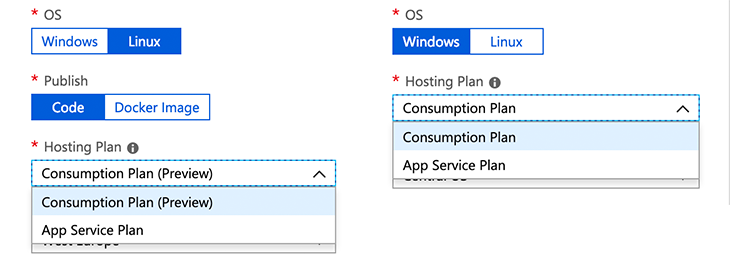
The process for creating Azure Functions is straightforward on the Azure Portal. The only confusing option you have to consider during the function creation is which hosting model to choose from the available choices. There are four different hosting plans to choose from, where you will also be able to determine which OS to host your functions. In this blog post, I’ll have a review of different choices and what suits you best. This is what you will see on Azure Portal when choosing your hosting plan:

Azure Functions hosting plans for each OS.

Consumption plan

Consumption plan is open on both Windows and Linux plans (Linux currently in the public preview). If you are new to the Azure Functions or need the function just up and running, I would recommend picking this plan, as it will make your life easier and you can get to the coding part rapidly. With this option, the function will dynamically allocate enough compute power or in other words, hosts to run your code and scale up or down automatically as needed. You will pay only for the use and not when for idle time. The bill is based aggregated from all functions within an app on the number of executions, execution time and memory used.

App Service Plan

App Service Plan is the second choice both available on Windows and Linux OS. This plan will dedicate you a virtual machine to run your functions. If you have long-running, continuous, CPU and memory consumable algorithms, this is the option you want to choose to have the most cost-effective hosting plan for the function operation. This plan makes it available to choose from Basic, Standard, Premium, and Isolated SKUs application plans and also connect to your on-premises VNET/VPN networks to communicate with your site data. In this plan, the function will not consume any more than the cost of the VM instance that is allocated. Azure App Service Plans can be found from Microsoft’s official documentation.

An excellent example for choosing the App Service Plan is when the system needs continuously crawl for certain data eighter from on-premises or the internet and save the information to Azure Blob Storage for further processing.

Containers
Azure Functions also supports having custom Linux images and containers. I’ll dedicate a blog post for that option shortly.

Timeouts

The function app timeout duration for Consumption plan by default is five minutes and can be increased to ten minutes in both version one and two. For the App Service plan version one has an unlimited timeout by default but the time out for version two of functions is 30 minutes which can be scaled to unlimited if needed.

After creating the function with a particular hosting plan, you cannot change it afterwards, and the only way is to recreate the Function App. The current hosting plan on the Azure Portal is available under the Overview tab when clicking on the function name. More information about pricing can be found from the Azure functions pricing page.

One of the most popular Azure features is Azure App Services and the Platform as a Service (PaaS) architecture approach. It merely removes the overhead of setting up additional infrastructure, speeds up to get apps up and running and is an economical solution for hosting user faced web apps or API solutions for the web or mobile apps. For the last few years, App Services has played a significant role in the architecture and services I design for the customers.

As the need for background processes increased, Microsoft introduced Azure WebJobs as a part of Azure Web Apps, and it was the first step towards the functional serverless architecture. A WebJob is a workflow step which has a trigger based on time or, e.g. Azure storage features to undertake a specific logical task. WebJobs are a powerful tool to process data and create further actions based on business rules. The downside is that it has a poor modification, monitoring and laborious logging features from the UI compared to Azure Functions.

By publishing the Functions to Azure, it was a game changer in architectural plans and the way handling background processes in the Microsoft cloud. Azure Functions are hosted on-top of Azure Web Apps architecture and can trigger by HTTP requests, time schedules, events in Azure Storage, Service Bus or Azure Event Hub. The full introduction to Functions is available on Microsoft’s documentation.

Functions Apps can be created using developers prefered programming languages like C# or JavaScript either from the Azure Portal using the web editor or using Visual Studio. Cross-platform developers can use the Visual Studio Code for development using their non-windows environments.

Azure Functions have two runtime versions, and there are significant differences between versions one and two. Version 2.X is running in a sandbox, and it will limit access to some specific libraries in C# and .net core. As an example, if your function is manipulating images or videos, you don’t have access to the framework GUI libraries, and you will face exceptions. The version 1.X uses the .NET Framework 4.7 and is a powerful and alternative runtime for processes where full access to .NET Framework libraries are needed. The full list of supported languages and runtimes are available on the Microsft’s documentation.

Here is an example of the usage of Functions:
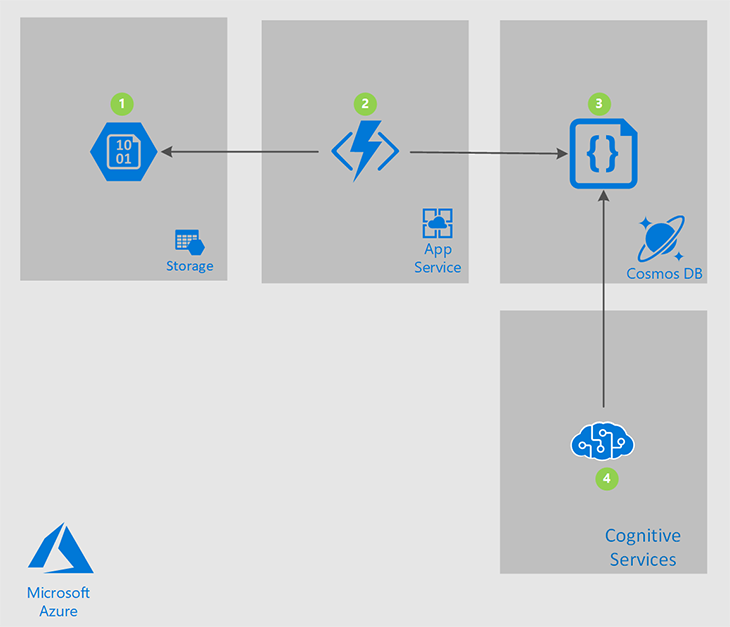
A client has financial data in different file formats and needs to process the information. The client receives most of the data in text-based PDF format. Using Functions is a perfect way to process textual context from PDF files to create data for search and Artificial intelligence. The following drawing illustrates the architecture.

  1. Azure blob storage to host files and PDF documents
  2. Azure Function which will be triggered as a new file is added to a container
  3. Azure Cosmosdb to save the content of the PDF file as JSON format
  4. Azure Cognitive Services to process textual context

It took me nine months to relax from my previous entrepreneurship era and start a new career as a Technology Advisor at Futurice Ltd in London. During the nine months period, I had enough time to explore new markets and think about what could be my next interesting and lucrative move. I’m going to write more about my explores later, but first I will share my thoughts about finding a job in London as it is in my fresh memory.

I started my professional career in Finland and worked there more than a decade in a limited, competitive and small but interesting, forward-going, time-ahead, and high-tech market. During this time I always had in my mind either expand my company to a larger market or move eventually to a metropolitan city. London was always my first choice as it is a metropolitan city in Europe and most large global companies have an ongoing operation in the UK. The mission of a new job search started at the beginning of August and I signed my contract at the beginning of September. Here are my learnings and considerations:

1. Don’t look for a job remotely

My family has a holiday residence in Southern-Spain and I was settled there during the summer. The new job operation kicked started from there by updating the CV and having my Spanish phone number in the contact information. After uploading the CV to various job-sites and having discussions with recruiters I found out that not being in the UK and not having a UK phone number was a show-stopper. That’s why I decided to travel to Londo, stay for a few weeks and buying a pre-paid phone number was my first action.

2. Don’t be passive and sell your self

If you are moving to the UK from another market/country it is obvious you are unknown professional. After having your CV uploaded to a job site do not wait for companies or recruiters to be in touch with you. List all interesting roles with contact details for your self and start to call them as much as you can. This stage reminded me of the start-up phase of Digital Illustrated where I had to call and introduce the company, but without a proper CRM system.

3. Don’t make compromises for your level of professionality

At the beginning of the search phase, I thought by reducing my expectations I will be faster to get a contract as I was not looking for a permanent position. It didn’t take me long to familiarize my self with the terminology of “Over-Qualified”. I guess this is a cultural matter as I did not come across this term in Finland. Basically, don’t Apply for a lower skilled position. For example, if your CV says you are an architect and you have done the job for certain years do not apply for a programmer position. Most companies will decline your application and will justify and explain the decision by the lack of motivation or “you will get bored and leave” message.

4. The market of recruiters

There are hundreds of recruiting agencies in the UK and they are all super active to hunt you down. The moment your CV gets indexed in the search results you will have calls from early morning until the afternoon. Remember to take a note of your discussions and make some background check. Some of these agencies are more professional than others

5. Do not sign any agreement during the search phase

Some recruitment agencies will try to send you terms and conditions during the search phase to be accepted. I noticed even a non-competition and NDA agreement. DO NOT SIGN any AGREEMENT with them during the search phase, even if they refuse to see you or insist to sign before having a face-to-face meeting.

6. Be careful with Job descriptions and roles

Don’t waste your time with generic job descriptions. For example the job description “.Net Developer” can be everything between Desktop Application development to Web Development. Be accurate with the job description and all bullet points. Even a small bullet point can be important to the employer and later will be a shop-stopper and waste of time!

7. Do not freeze your CV

My CV was made in Finland for enterprise level sales use. During my career, I had all kind of profession information available in my CV and that made my CV not longer than eight pages. Remember to have only essential information available in the CV, take feedback from each recruited you communicate with, and make sure the CV is two pages long with the most important information on the front page.

8. Avoid strange interviews

At some point, the recruiting company will ask you to have an interview with the client. I faced few strange interviews in where the client sent me an online task with limited time. The task I got had nothing to do with the role I applied for and it was a waste of time. I also had a phone interview in where the client decided to show their super skills and asking super detailed questions. Try to avoid none face-to-face interviews if there will be a task to accomplish.

9. Keep your options always open

Do not reject any role until you have a signed contract. There is always a tinny possibility to have complications on the road. After signing the desired contract remember to decline other offers politely and keep doors open for the future.

Here are some other hints you may find interesting:

  • Take your time to negotiate but be fast to make decisions
  • Remember always to do some background check about the client
  • Prefer direct discussions with companies rather than recruiting companies
  • Do some research about rates for certain positions, if you are looking for a contract position and year salary if you are keen to permanent positions
  • Money is not everything and not the most important driver. The role and the employer have more impact on your daily work, motivation, and work satisfaction.

Recently I have seen some motivation videos about successful people like Jack Ma or Elon Musk on Facebook. The Video begins by telling how miserable was their life by failing over and over, dropping-off or leaving the university, nobody wanted to give them a job and then something happens. Their life changed by trying harder and they become successful, a Billionaire! I guess in most cases becoming a Millionaire/Billionaire part is what makes people watch those videos?

The only thing I could say about those videos is that working hard, finishing things you started with high quality, not spending your time with losers and not wasting time by doing fruitless thigs is the absolute key to success. As a teenager, I attended all classes and tried to get the best grade. I entered the university by studying hard and by getting the full points from the entrance exam. During my bachelor and master studies, I did all studies with the highest motivation and also by trying to be a model student. After the graduation, there has not been a day without studying or trying new things! As I have said before there is not a shortcut in life!

In my earliest blogs, I explained my experiments to work for a large global corporation and my road to becoming an entrepreneur. It was seven years ago during the Christmas holidays when I decided to leave the golden cage (if you can call it even a golden cage) and become a founder and join a Start-Up. Seven years later after hundreds of sales meetings and completed projects, hiring 50 amazing workmates we did the best year ever at Digital Illustrated. The growth of the company was over 50% compared to 2016 with a turnover of 6,2 million euro. We made over 24% earnings before interest, taxes, and amortization (EBITA) which is amazing in the ICT consulting business. The gains explain how efficient is the business and organization model and how self-managing organization can be fertile!

The following chart demonstrates the growth of Digital Illustrated from 2011 to 2017.

Beside the economical aspect past seven years has made me a new person. Continuous hanger for new information, competition with other companies during the bad economic situation and financial depression, office management, personal time management, sales and marketing, HR, building the corporate culture, recruiting, mentoring, entrepreneurship, board working, customer and partner relations, Selling the company and the process related to the EXIT and eventually not giving up in any situation are among the biggest learnings I embraced. For the past months, I have had some questions in my mind:

  • When is the time to let go and look for new opportunities?
  • How easily can you let things you created with your all your heart go and continue with something new in your life?
  • Is there a guarantee that the new adventure will bring you success and/or satisfaction?
  • Do you need a change in your life when you are successful and satisfied?

To find answers to my questions I have decided to leave my current position at Digital Illustrated. I’m going to have at least six months break from my day job. I have not resigned from the company and might get back to work but again once an entrepreneur always an entrepreneur. At this point, I want to thank my family for the great support, my co-founders for the amazing teamwork and the rest of the staff (those who are and are not anymore working for DI) to make this amazing and successful voyage possible. I guess this is a sweet goodbye for now!

Recently, I attended a conference at Metropolia University of Applied Science as a co-speaker with my dear friend and workmate Jouko Nyholm. We attended to present about “Enterprise IT and Microsoft Solutions”. Attendees were a group of final year students from the Information Technology and Media engineering course. I spoke about entrepreneurship and during the questions and answer part, a student raised a funny question. The question was “So what is the next good idea to create a new start-up?”. My answer included giving the student advice to read the first part of “An Excellent Idea For a Start-Up (Part 1)” and wait for this blog post. If you haven’t read the first part of my blog post about the perfect idea, I recommend reading it first before continuing with this subsequent post.

Most successful Enterprises are mission oriented. It is extremely hard to gather a large group of people together and have their focus set to produce maximum productivity the company needs to perform an important and successful mission. It is almost impossible to succeed without a good founding idea. If the group does not feel the passion and love for what they are developing, they give up at a certain point in time. There is no way to keep the group together and execute the given mission, specially during the difficult times. Most young founders specially students think that the start-up phase will take a few years and maybe after that phase, the group would feel passionate about the idea. However  as I explained before the start-up will take 5-10 years to succeed.

One of the biggest mistakes is to copy an idea with small new insights. The act of copying does not excite people at all and it will not make the team work hard enough to be successful. The puzzle of creating a new idea is the problem that most founders face.

The fact is that the more you practice, the better you become and it is effectively worth trying to get more innovative and productive with the puzzle. The strange part of creating a greater idea is that, the best ideas look terrible at the beginning.

In my case, creating a company with small resources and no enterprise references sounded ridiculous. To be honest no Chief Information Officer (CIO) wanted a garage start-up as an enterprise service provider. The idea of creating a new cloud service provider sounded odd at the beginning because of the lack of trust and market size at that moment but it turned out to be a really good idea as the enterprise cloud transformation started to grow.

The idea to provide the same service as other competitors with the same project model and quality would have been insane and would have never took-off.  Entrepreneurs should look for a small market to gain a large part of it and expand the business fast. You should say to yourself; today only a small group of users or companies will use my products or services, but in the future, most of decision-makers will demands to use our services or products.

The entrepreneurs should keep in mind that if they come with a great idea it is possible that most people will keep it as a bad idea. You should not grieve but instead feel happy about it. This is the reason it is not dangerous always to tell others about the idea. Keep also in mind that the bad idea does not sound to be worth to be stolen. Basically, what is needed is an idea that many people are not working on it and it is more than okay that it doesn’t sound big at the beginning. The common mistake amongst young entrepreneurs is that they think the idea they have should sound or be big.

Here comes the secret of perfect idea: after figuring out a new idea, you should evaluate the market. What is needed is a market that is going to be big in 10 years. Most of the people are only interested in the market size existant today and they don’t think at all how the market is going to evolve. The mentioned mistake is not only amongst founders but also among the investors too. Some investors care about the current size of the start-up and not the size of the market in the near feature. In the small markets which expands fast, customers are looking desperately for a solution and have the will to pay for the cure you have for their needs. The important fact is that you cannot create a market which does not want to exist. You can change almost everything from the start-up but not the market. You should make sure and double check that the market you are looking for exists and will likely grow. The fast growing of the market is the most important thing!

Let’s wrap up the blog post:

  • Your mission is important to motivate people in the start-up and increase the productivity
  • A bad idea is always bad and will not change the way people think about it and will get worse during the difficult times
  • Copying an idea with no new insight is wasting time of the whole start-up
  • The more you practice developing ideas, the better you will get, so keep trying!
  • The idea doesn’t have to sound amazing and big at the beginning
  • Share your ideas with others and don’t be scared
  • The market is the most important thing with the new idea
  • Choose a market which exists, and will grow fast
  • You can change everything in your start-up but not the market

Over a decade of being a part of Microsoft ecosystem and solving customer’s needs, one of the most challenging tasks has been the engagement of customers and providing self-service systems to the end-users. In the old days and even currently some enterprises refer to the system as an “Extranet”. The cloud era and especially Microsoft’s Azure and the seamless integration between services has eventually changed the world.

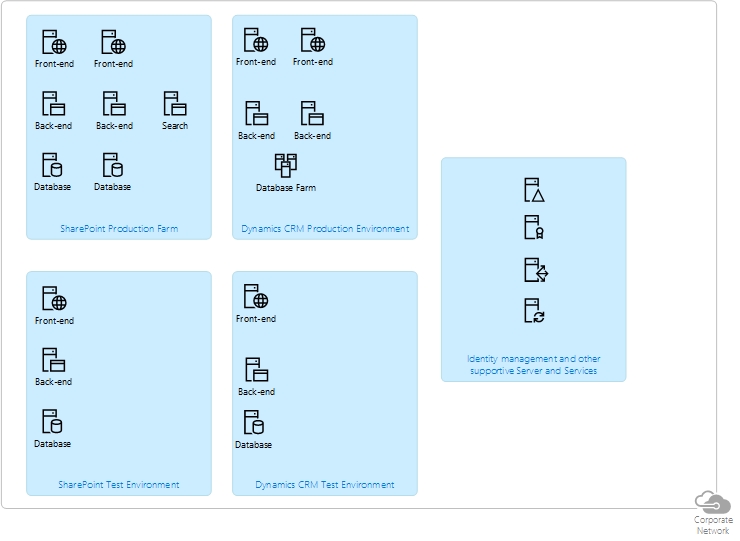
Few years ago to have an environment where customers could authenticate, update their personal and professional information, interact with the enterprise and provide documents could cost hundreds of thousands euros. In most cases SharePoint was acting as the extranet platform, secondary Active Directory as the identity management system and Dynamics CRM as customer management system to hold customer information. Not to mention the integration platforms to solve the needs of communication between systems. For the risk, reliability, stability and usage load management all the platforms and systems had to be in a farm and at least duplicated for testing purposes. In most cases the capacity provided for the environments was frequently in the idle mode. The drawing below demonstrates a simple architecture of an on-premises server farm environment.

The minimal architecture

The costs mentioned above were only the hardware costs for the start.  The other costs for the project were the development and the maintenance fees which were much greater than budgets planned for the “Extranet” projects these days. The main reason for the bigger expenses was the custom made code created for platforms. Nowadays the need of custom coding is much smaller and most of the custom features are a part of the platforms.

Last fall Microsoft acquired a company called Adxstudio Inc. Since then I have been following the main cloud-based portal product of Adxstudio. The product is built on-top of Microsoft Dynamics CRM/XRM which is nowadays under the Dynamics 365 brand. User authentication is handled by the Azure Active Directory but user profiles are stored in the XRM as a contact record which can  interact with other entities in the CRM context. CRM entities and actions are extended to the web and information gathering is made amazingly easy. The product provides Content Management capabilities and search to create richer information management in the portal. As the technical perspective the UI is created by modern HTML 5 and CSS3 web technologies by using the Bootstrap framework to provide responsive mobile web pages.

But what concepts and features can be provided by the Dynamics 365 Portal to the end-users?
Here is a list of some concepts and ideas:

  • Customer service: help desk, account management and knowledge base
  • Communities and information sharing: discussion forums, idea management, polls and surveys
  • E-commerce: Transactions, invoice and order management, product and quotes management
  • Government: Services provided to citizens or emergency management
  • Marketing: Branding and design, conference and event management and lead generation forms

Each portal instance is hosted on Microsoft Azure and has some integration support for other Microsoft cloud based products like SharePoint. To keep integrations in mind, the product supports fully REST API and JavaScript can be used for the AJAX calls.

Currently the portal costs $500/year/instance but with each Dynamics 365 subscription the customer will get one instance of Dynamics Portals for free!
To refresh our memory each instance requires a Dynamics 365 CRM instance to which the portal will be attached during the installation/deployment phase. Corporate staff should have a CRM licence to be able use the portal but there can be unlimited amount of  external users for free!

In my next blog posts related to Dynamics 365 Portals I’ll go through the deployment process and features available in the product. My goal is to evaluate the product and give the business and technical staff better understanding of the product.